
A passive KanColle companion
Your whole fleet, one panel
Fleet Chronometer only reads the responses the game already receives. Fleets, expeditions, docking, land-based air, battle prediction and fuel/ammo estimates sit in one panel, backed by a local history you can search and back up.
Free and open source. Your data stays in your browser.
Run a sortie in your browser
This is the extension’s real panel, fed with packets from an actual event-map sortie. Press Next to send them one by one and watch the panel react. Tabs, fleet switches and expandable rows are all clickable.
The home port, equipment and timers are sample data; the battle packets come from a real sortie.
Loading panel…
Features
What you need mid-sortie, and what you want to look up later.
Live panel
Fleet HP, morale and supply, expedition and docking timers with notifications, land-based air and map gauges.
Battle prediction
Post-battle HP, rank, MVP and heavy-damage warnings, computed from the game’s own packets.
Fuel and ammo estimates
Estimated per node during a sortie, then corrected with the real numbers back at port.
Sortie log
One card per sortie: route, fleet, per-node detail, support and land-based air waves. Exportable as replays.
Resource log
All eight resources on one chart, with spending totals for each event map.
Quest guide
Tracks quest progress and prerequisites, and checks conditions against your current fleet.
Ship and equipment lists
Your full collection, filterable and sortable, plus an equipment reference.
Local backup
Export to a folder you choose, with an offline HTML viewer that plays replays without the extension.
How it works
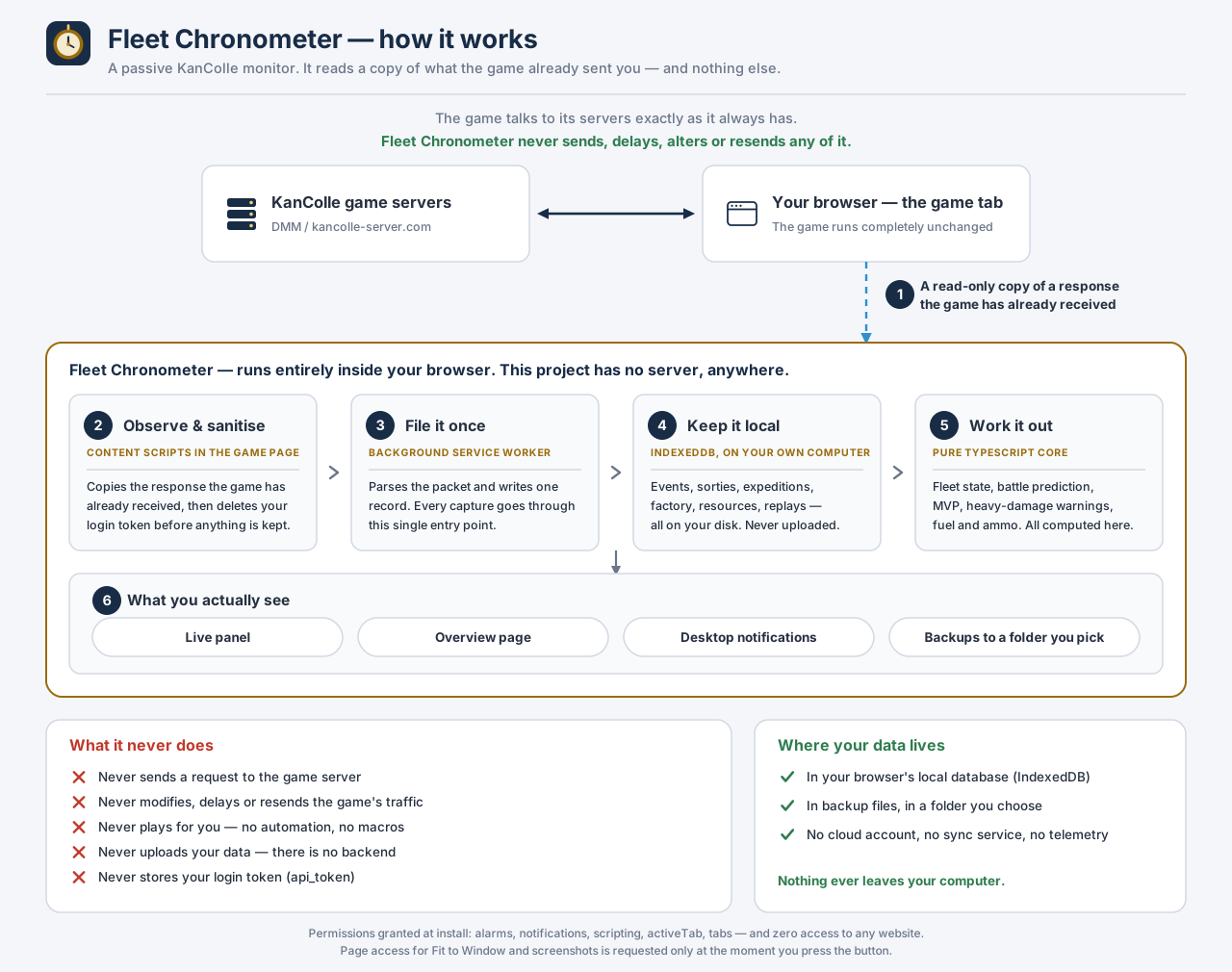
The game talks to its server exactly as it always does. Fleet Chronometer reads a copy of responses the game already received, strips the login token, and computes fleet state and battle predictions on your machine.
Private and safe by design
Passive only
It observes the game’s own traffic. It never replays, modifies or sends requests, and never plays for you.
Credentials stay put
The login token is removed before anything is stored or passed along, and is never saved.
Nothing is uploaded
Every record lives in your browser’s IndexedDB. There is no backend server.
Minimal permissions
No access to the game site at install time; it asks only when you turn on window fitting.
Get started
Install it from the Chrome Web Store, open the game, and click the extension icon to open the panel. It also works in Microsoft Edge and other Chromium browsers.
The project is in public testing. Run it alongside another companion tool, cross-check important information, and back up records you care about.